
Example
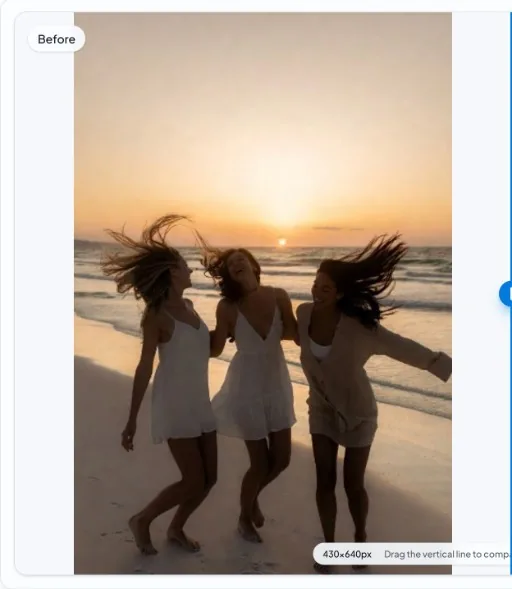
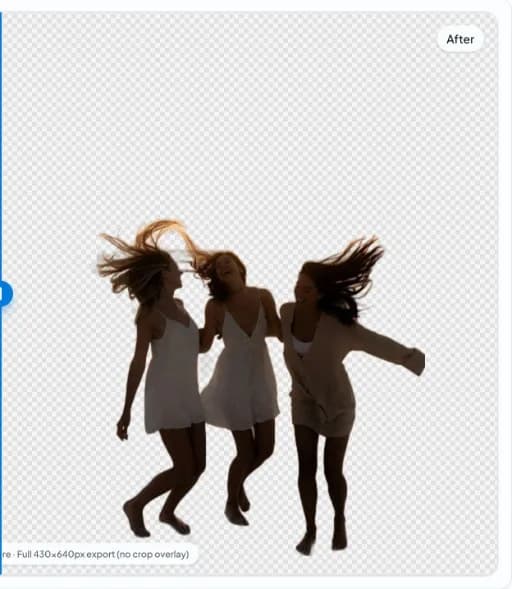
Hair Detail Background Removal Example
Fine hair and wind-blown strands on a sunset beach—real in-app before/after from nobg.eu.
In short
- Challenge: many fine strands against a bright sky.
- Expectation: preserve flyaway hair without a heavy halo.
- Hair Detail: verify backdrop contrast before trusting a single-pass mask.
- Hair Detail: keep originals; never overwrite masters with social recompressions.
- Hair Detail: preview cutouts on white and dark UI plates prior to upload.
- Hair Detail: document crop padding so series look consistent in grids.
- Hair Detail: if interiors (handles/mesh) vanish, re-check mask holes at 200% zoom.
- Hair Detail: preferred export is PNG/WebP with alpha for remix workflows.
Before
After
Hair Detail section 1: practical detail
For Hair Detail workflows on nobg.eu, treat background removal as a controlled production step rather than a one-click gamble. Example guidance 1 for Hair Detail focuses on capture, mask QA, and export discipline shown in the before/after pair. Start from a source file that already separates the subject from the backdrop in luminance and color; local segmentation amplifies good capture decisions and cannot invent missing edge data. Open the asset in the browser editor, run on-device inference, then inspect the mask at 100–200% zoom along high-risk edges before you export. Use the on-page media as a visual reference, then repeat the checklist on your own files before publishing. Prefer transparent PNG or WebP masters when downstream systems support alpha, and flatten to a channel-required solid fill only after QA. Document filename patterns, padding conventions, and review checklists so teammates repeat the same quality bar without re-uploading assets to an external cutout API for every draft. When edges fail, fix lighting or reshoot rather than endlessly masking a compromised source—this is usually faster for Hair Detail catalogs and keeps privacy intact because pixels for the core edit stay in the browser session.
Hair Detail section 2: practical detail
For Hair Detail workflows on nobg.eu, treat background removal as a controlled production step rather than a one-click gamble. Example guidance 2 for Hair Detail focuses on capture, mask QA, and export discipline shown in the before/after pair. Start from a source file that already separates the subject from the backdrop in luminance and color; local segmentation amplifies good capture decisions and cannot invent missing edge data. Open the asset in the browser editor, run on-device inference, then inspect the mask at 100–200% zoom along high-risk edges before you export. Use the on-page media as a visual reference, then repeat the checklist on your own files before publishing. Prefer transparent PNG or WebP masters when downstream systems support alpha, and flatten to a channel-required solid fill only after QA. Document filename patterns, padding conventions, and review checklists so teammates repeat the same quality bar without re-uploading assets to an external cutout API for every draft. When edges fail, fix lighting or reshoot rather than endlessly masking a compromised source—this is usually faster for Hair Detail catalogs and keeps privacy intact because pixels for the core edit stay in the browser session.
Hair Detail section 3: practical detail
For Hair Detail workflows on nobg.eu, treat background removal as a controlled production step rather than a one-click gamble. Example guidance 3 for Hair Detail focuses on capture, mask QA, and export discipline shown in the before/after pair. Start from a source file that already separates the subject from the backdrop in luminance and color; local segmentation amplifies good capture decisions and cannot invent missing edge data. Open the asset in the browser editor, run on-device inference, then inspect the mask at 100–200% zoom along high-risk edges before you export. Use the on-page media as a visual reference, then repeat the checklist on your own files before publishing. Prefer transparent PNG or WebP masters when downstream systems support alpha, and flatten to a channel-required solid fill only after QA. Document filename patterns, padding conventions, and review checklists so teammates repeat the same quality bar without re-uploading assets to an external cutout API for every draft. When edges fail, fix lighting or reshoot rather than endlessly masking a compromised source—this is usually faster for Hair Detail catalogs and keeps privacy intact because pixels for the core edit stay in the browser session.
Hair Detail section 4: practical detail
For Hair Detail workflows on nobg.eu, treat background removal as a controlled production step rather than a one-click gamble. Example guidance 4 for Hair Detail focuses on capture, mask QA, and export discipline shown in the before/after pair. Start from a source file that already separates the subject from the backdrop in luminance and color; local segmentation amplifies good capture decisions and cannot invent missing edge data. Open the asset in the browser editor, run on-device inference, then inspect the mask at 100–200% zoom along high-risk edges before you export. Use the on-page media as a visual reference, then repeat the checklist on your own files before publishing. Prefer transparent PNG or WebP masters when downstream systems support alpha, and flatten to a channel-required solid fill only after QA. Document filename patterns, padding conventions, and review checklists so teammates repeat the same quality bar without re-uploading assets to an external cutout API for every draft. When edges fail, fix lighting or reshoot rather than endlessly masking a compromised source—this is usually faster for Hair Detail catalogs and keeps privacy intact because pixels for the core edit stay in the browser session.
Hair Detail section 5: practical detail
For Hair Detail workflows on nobg.eu, treat background removal as a controlled production step rather than a one-click gamble. Example guidance 5 for Hair Detail focuses on capture, mask QA, and export discipline shown in the before/after pair. Start from a source file that already separates the subject from the backdrop in luminance and color; local segmentation amplifies good capture decisions and cannot invent missing edge data. Open the asset in the browser editor, run on-device inference, then inspect the mask at 100–200% zoom along high-risk edges before you export. Use the on-page media as a visual reference, then repeat the checklist on your own files before publishing. Prefer transparent PNG or WebP masters when downstream systems support alpha, and flatten to a channel-required solid fill only after QA. Document filename patterns, padding conventions, and review checklists so teammates repeat the same quality bar without re-uploading assets to an external cutout API for every draft. When edges fail, fix lighting or reshoot rather than endlessly masking a compromised source—this is usually faster for Hair Detail catalogs and keeps privacy intact because pixels for the core edit stay in the browser session.
FAQ
FAQ 1 for Hair Detail?
For Hair Detail, keep inference local, zoom-check edges (focus 1), and export transparent masters before flattening for any channel that forbids alpha.
FAQ 2 for Hair Detail?
For Hair Detail, keep inference local, zoom-check edges (focus 2), and export transparent masters before flattening for any channel that forbids alpha.
FAQ 3 for Hair Detail?
For Hair Detail, keep inference local, zoom-check edges (focus 3), and export transparent masters before flattening for any channel that forbids alpha.
FAQ 4 for Hair Detail?
For Hair Detail, keep inference local, zoom-check edges (focus 4), and export transparent masters before flattening for any channel that forbids alpha.
FAQ 5 for Hair Detail?
For Hair Detail, keep inference local, zoom-check edges (focus 5), and export transparent masters before flattening for any channel that forbids alpha.
Related: Guides, Related solutions, About.