
Example
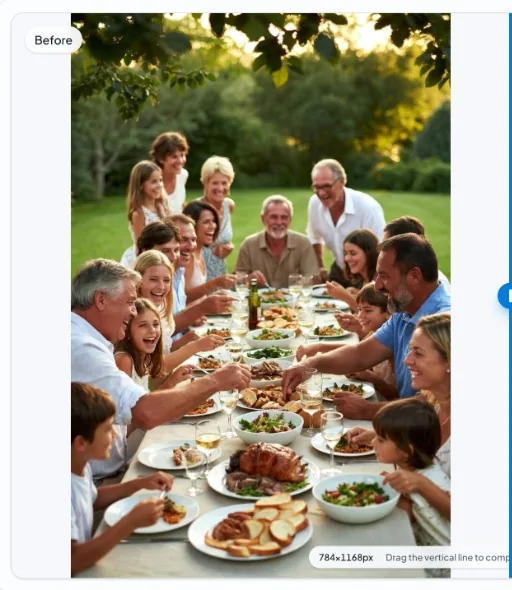
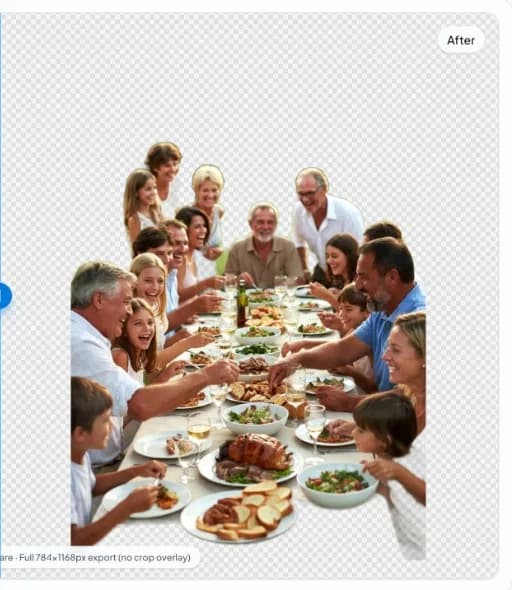
Difficult Edges Background Removal Example
Outdoor dinner scene—many people, glassware, and table clutter from nobg.eu.
In short
- Challenge: wine glasses, overlapping arms, complex foreground.
- Expectation: usable mask with manual QA on critical listings.
- Difficult Edges: verify backdrop contrast before trusting a single-pass mask.
- Difficult Edges: keep originals; never overwrite masters with social recompressions.
- Difficult Edges: preview cutouts on white and dark UI plates prior to upload.
- Difficult Edges: document crop padding so series look consistent in grids.
- Difficult Edges: if interiors (handles/mesh) vanish, re-check mask holes at 200% zoom.
- Difficult Edges: preferred export is PNG/WebP with alpha for remix workflows.
Before
After
Difficult Edges section 1: practical detail
For Difficult Edges workflows on nobg.eu, treat background removal as a controlled production step rather than a one-click gamble. Example guidance 1 for Difficult Edges focuses on capture, mask QA, and export discipline shown in the before/after pair. Start from a source file that already separates the subject from the backdrop in luminance and color; local segmentation amplifies good capture decisions and cannot invent missing edge data. Open the asset in the browser editor, run on-device inference, then inspect the mask at 100–200% zoom along high-risk edges before you export. Use the on-page media as a visual reference, then repeat the checklist on your own files before publishing. Prefer transparent PNG or WebP masters when downstream systems support alpha, and flatten to a channel-required solid fill only after QA. Document filename patterns, padding conventions, and review checklists so teammates repeat the same quality bar without re-uploading assets to an external cutout API for every draft. When edges fail, fix lighting or reshoot rather than endlessly masking a compromised source—this is usually faster for Difficult Edges catalogs and keeps privacy intact because pixels for the core edit stay in the browser session.
Difficult Edges section 2: practical detail
For Difficult Edges workflows on nobg.eu, treat background removal as a controlled production step rather than a one-click gamble. Example guidance 2 for Difficult Edges focuses on capture, mask QA, and export discipline shown in the before/after pair. Start from a source file that already separates the subject from the backdrop in luminance and color; local segmentation amplifies good capture decisions and cannot invent missing edge data. Open the asset in the browser editor, run on-device inference, then inspect the mask at 100–200% zoom along high-risk edges before you export. Use the on-page media as a visual reference, then repeat the checklist on your own files before publishing. Prefer transparent PNG or WebP masters when downstream systems support alpha, and flatten to a channel-required solid fill only after QA. Document filename patterns, padding conventions, and review checklists so teammates repeat the same quality bar without re-uploading assets to an external cutout API for every draft. When edges fail, fix lighting or reshoot rather than endlessly masking a compromised source—this is usually faster for Difficult Edges catalogs and keeps privacy intact because pixels for the core edit stay in the browser session.
Difficult Edges section 3: practical detail
For Difficult Edges workflows on nobg.eu, treat background removal as a controlled production step rather than a one-click gamble. Example guidance 3 for Difficult Edges focuses on capture, mask QA, and export discipline shown in the before/after pair. Start from a source file that already separates the subject from the backdrop in luminance and color; local segmentation amplifies good capture decisions and cannot invent missing edge data. Open the asset in the browser editor, run on-device inference, then inspect the mask at 100–200% zoom along high-risk edges before you export. Use the on-page media as a visual reference, then repeat the checklist on your own files before publishing. Prefer transparent PNG or WebP masters when downstream systems support alpha, and flatten to a channel-required solid fill only after QA. Document filename patterns, padding conventions, and review checklists so teammates repeat the same quality bar without re-uploading assets to an external cutout API for every draft. When edges fail, fix lighting or reshoot rather than endlessly masking a compromised source—this is usually faster for Difficult Edges catalogs and keeps privacy intact because pixels for the core edit stay in the browser session.
Difficult Edges section 4: practical detail
For Difficult Edges workflows on nobg.eu, treat background removal as a controlled production step rather than a one-click gamble. Example guidance 4 for Difficult Edges focuses on capture, mask QA, and export discipline shown in the before/after pair. Start from a source file that already separates the subject from the backdrop in luminance and color; local segmentation amplifies good capture decisions and cannot invent missing edge data. Open the asset in the browser editor, run on-device inference, then inspect the mask at 100–200% zoom along high-risk edges before you export. Use the on-page media as a visual reference, then repeat the checklist on your own files before publishing. Prefer transparent PNG or WebP masters when downstream systems support alpha, and flatten to a channel-required solid fill only after QA. Document filename patterns, padding conventions, and review checklists so teammates repeat the same quality bar without re-uploading assets to an external cutout API for every draft. When edges fail, fix lighting or reshoot rather than endlessly masking a compromised source—this is usually faster for Difficult Edges catalogs and keeps privacy intact because pixels for the core edit stay in the browser session.
Difficult Edges section 5: practical detail
For Difficult Edges workflows on nobg.eu, treat background removal as a controlled production step rather than a one-click gamble. Example guidance 5 for Difficult Edges focuses on capture, mask QA, and export discipline shown in the before/after pair. Start from a source file that already separates the subject from the backdrop in luminance and color; local segmentation amplifies good capture decisions and cannot invent missing edge data. Open the asset in the browser editor, run on-device inference, then inspect the mask at 100–200% zoom along high-risk edges before you export. Use the on-page media as a visual reference, then repeat the checklist on your own files before publishing. Prefer transparent PNG or WebP masters when downstream systems support alpha, and flatten to a channel-required solid fill only after QA. Document filename patterns, padding conventions, and review checklists so teammates repeat the same quality bar without re-uploading assets to an external cutout API for every draft. When edges fail, fix lighting or reshoot rather than endlessly masking a compromised source—this is usually faster for Difficult Edges catalogs and keeps privacy intact because pixels for the core edit stay in the browser session.
Why this demo is hard
Glass, fine pattern, and low contrast stress segmentation.
When to reshoot
If edges remain unusable after two attempts, change backdrop.
Expanded Difficult Edges detail 1
For Difficult Edges workflows on nobg.eu, treat background removal as a controlled production step rather than a one-click gamble. Expanded merge content 1 for Difficult Edges. Start from a source file that already separates the subject from the backdrop in luminance and color; local segmentation amplifies good capture decisions and cannot invent missing edge data. Open the asset in the browser editor, run on-device inference, then inspect the mask at 100–200% zoom along high-risk edges before you export. Append-only depth for AdSense-quality pages. Prefer transparent PNG or WebP masters when downstream systems support alpha, and flatten to a channel-required solid fill only after QA. Document filename patterns, padding conventions, and review checklists so teammates repeat the same quality bar without re-uploading assets to an external cutout API for every draft. When edges fail, fix lighting or reshoot rather than endlessly masking a compromised source—this is usually faster for Difficult Edges catalogs and keeps privacy intact because pixels for the core edit stay in the browser session.
Expanded Difficult Edges detail 2
For Difficult Edges workflows on nobg.eu, treat background removal as a controlled production step rather than a one-click gamble. Expanded merge content 2 for Difficult Edges. Start from a source file that already separates the subject from the backdrop in luminance and color; local segmentation amplifies good capture decisions and cannot invent missing edge data. Open the asset in the browser editor, run on-device inference, then inspect the mask at 100–200% zoom along high-risk edges before you export. Append-only depth for AdSense-quality pages. Prefer transparent PNG or WebP masters when downstream systems support alpha, and flatten to a channel-required solid fill only after QA. Document filename patterns, padding conventions, and review checklists so teammates repeat the same quality bar without re-uploading assets to an external cutout API for every draft. When edges fail, fix lighting or reshoot rather than endlessly masking a compromised source—this is usually faster for Difficult Edges catalogs and keeps privacy intact because pixels for the core edit stay in the browser session.
Expanded Difficult Edges detail 3
For Difficult Edges workflows on nobg.eu, treat background removal as a controlled production step rather than a one-click gamble. Expanded merge content 3 for Difficult Edges. Start from a source file that already separates the subject from the backdrop in luminance and color; local segmentation amplifies good capture decisions and cannot invent missing edge data. Open the asset in the browser editor, run on-device inference, then inspect the mask at 100–200% zoom along high-risk edges before you export. Append-only depth for AdSense-quality pages. Prefer transparent PNG or WebP masters when downstream systems support alpha, and flatten to a channel-required solid fill only after QA. Document filename patterns, padding conventions, and review checklists so teammates repeat the same quality bar without re-uploading assets to an external cutout API for every draft. When edges fail, fix lighting or reshoot rather than endlessly masking a compromised source—this is usually faster for Difficult Edges catalogs and keeps privacy intact because pixels for the core edit stay in the browser session.
Expanded Difficult Edges detail 4
For Difficult Edges workflows on nobg.eu, treat background removal as a controlled production step rather than a one-click gamble. Expanded merge content 4 for Difficult Edges. Start from a source file that already separates the subject from the backdrop in luminance and color; local segmentation amplifies good capture decisions and cannot invent missing edge data. Open the asset in the browser editor, run on-device inference, then inspect the mask at 100–200% zoom along high-risk edges before you export. Append-only depth for AdSense-quality pages. Prefer transparent PNG or WebP masters when downstream systems support alpha, and flatten to a channel-required solid fill only after QA. Document filename patterns, padding conventions, and review checklists so teammates repeat the same quality bar without re-uploading assets to an external cutout API for every draft. When edges fail, fix lighting or reshoot rather than endlessly masking a compromised source—this is usually faster for Difficult Edges catalogs and keeps privacy intact because pixels for the core edit stay in the browser session.
Expanded Difficult Edges detail 5
For Difficult Edges workflows on nobg.eu, treat background removal as a controlled production step rather than a one-click gamble. Expanded merge content 5 for Difficult Edges. Start from a source file that already separates the subject from the backdrop in luminance and color; local segmentation amplifies good capture decisions and cannot invent missing edge data. Open the asset in the browser editor, run on-device inference, then inspect the mask at 100–200% zoom along high-risk edges before you export. Append-only depth for AdSense-quality pages. Prefer transparent PNG or WebP masters when downstream systems support alpha, and flatten to a channel-required solid fill only after QA. Document filename patterns, padding conventions, and review checklists so teammates repeat the same quality bar without re-uploading assets to an external cutout API for every draft. When edges fail, fix lighting or reshoot rather than endlessly masking a compromised source—this is usually faster for Difficult Edges catalogs and keeps privacy intact because pixels for the core edit stay in the browser session.
FAQ
FAQ 1 for Difficult Edges?
For Difficult Edges, keep inference local, zoom-check edges (focus 1), and export transparent masters before flattening for any channel that forbids alpha.
FAQ 2 for Difficult Edges?
For Difficult Edges, keep inference local, zoom-check edges (focus 2), and export transparent masters before flattening for any channel that forbids alpha.
FAQ 3 for Difficult Edges?
For Difficult Edges, keep inference local, zoom-check edges (focus 3), and export transparent masters before flattening for any channel that forbids alpha.
FAQ 4 for Difficult Edges?
For Difficult Edges, keep inference local, zoom-check edges (focus 4), and export transparent masters before flattening for any channel that forbids alpha.
FAQ 5 for Difficult Edges?
For Difficult Edges, keep inference local, zoom-check edges (focus 5), and export transparent masters before flattening for any channel that forbids alpha.
Jewelry?
Macro with contrasting surface underneath.
Mesh fabrics?
Small holes may fill—adjust expectations.
How should I prepare source images for Difficult Edges?
Shoot or select files for Difficult Edges with clear subject/backdrop separation, even lighting, and enough resolution for your final export. Soft shadows glued to the silhouette are harder to salvage than sparse backgrounds.
Does nobg.eu upload Difficult Edges assets for the core cutout?
No. Segmentation for the core edit runs locally in your browser session. Site analytics or optional ads are separate from the cutout pipeline—see the Privacy Policy.
Which export format fits Difficult Edges delivery?
Use transparent PNG or WebP when your destination supports alpha. Flatten to solid white or brand color only when a marketplace or print pipeline requires it, after edge QA on the Difficult Edges asset.
What usually breaks Difficult Edges masks?
Low contrast edges, heavy JPEG blocking, motion blur, and backdrops matching subject luminance. Fix capture first; then re-run local segmentation on a cleaner source.
How do I QA a finished Difficult Edges cutout?
Preview on white, dark, and brand-colored plates. Zoom into labels, hairlines, glass, and interior holes. Reject exports with halos or chewed corners before publishing.
Related pages
Related: Guides, Related solutions, About.